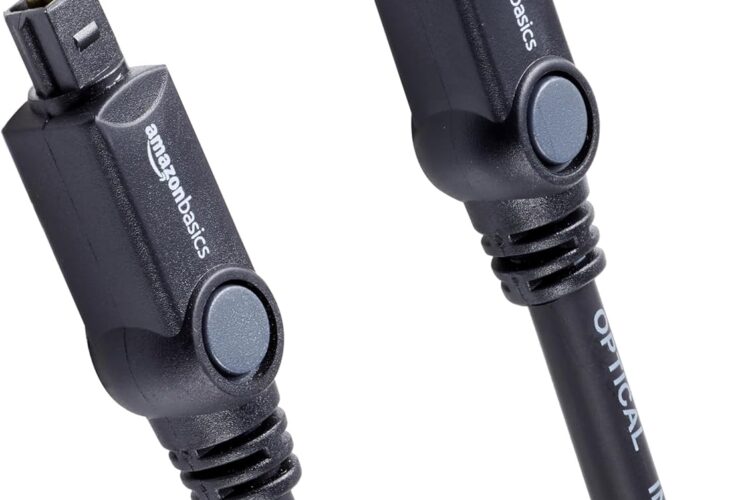
In the world of home audio and entertainment, the quality of your connections matters just as much as the quality of your equipment. You could have the most expensive soundbar, the most powerful AV receiver, or the most sophisticated home theater system on the market — but if the cables connecting your devices aren’t up to the task, you’re leaving significant audio quality on the table. The Amazon Basics Toslink Digital Optical Audio Fiber Optic Cable is designed to solve exactly this problem, delivering a clean, clear, interference-free digital audio signal between your devices with reliability and durability you can count on.
In this comprehensive guide, we’ll explore everything you need to know about Toslink optical audio cables — what they are, how they work, why they matter, and how the Amazon Basics 6-foot version fits into your home audio setup. Whether you’re a seasoned audiophile, a home theater enthusiast, a casual gamer, or someone simply looking to get better sound from their television setup, this article will give you a thorough understanding of optical audio technology and how to make the most of it. Let’s dive in! 🚀
🎧 What Is a Toslink Digital Optical Audio Cable?
Before diving into the specifics of the Amazon Basics cable, it’s worth taking a moment to understand what a Toslink cable actually is and why it represents such an important component in modern audio setups.
Toslink — short for Toshiba Link — is a standardized optical fiber connector system originally developed by Toshiba in the 1980s for use in their CD players. Since then, it has become one of the most widely used digital audio connection standards in consumer electronics worldwide.
Unlike traditional analog audio cables that carry electrical signals through copper wires, Toslink cables transmit digital audio data as pulses of light through a fiber optic core. This fundamental difference has profound implications for audio quality:
⚡ Electrical Isolation
Because the signal is transmitted as light rather than electricity, there is complete electrical isolation between the connected devices. This eliminates a common source of audio degradation known as ground loop interference — the annoying hum or buzz that can appear in audio systems when multiple devices share a common electrical ground.
🛡️ Immunity to Electromagnetic Interference (EMI)
Copper cables can pick up electromagnetic interference from nearby devices — power supplies, motors, other cables, and various electronic components can all introduce noise into an audio signal carried by metal conductors. Fiber optic cables are completely immune to EMI because light is not affected by electromagnetic fields. The result is a cleaner, purer signal delivery.
📡 Digital Precision
Because the audio data is transmitted digitally, the signal either arrives correctly or it doesn’t — there’s no gradual degradation or distortion in the way analog signals can suffer. This binary nature of digital transmission means you get a bit-perfect signal transfer from source to destination.
📦 What’s in the Box?
The Amazon Basics Toslink Digital Optical Audio Cable package is refreshingly simple and complete:
🔌 One 6-foot (approximately 1.8 meter) Toslink optical audio cable in classic black
🧢 Removable rubber protective tips on each connector end
⚠️ Important Note: Before using the cable, you must remove the protective end caps from both connector ends. These rubber tips protect the delicate fiber optic ends from dust and damage during shipping and storage, but they must be taken off before the cable can transmit any signal. This is a simple step that’s easy to overlook, so it’s worth emphasizing right from the start.
✨ Key Features: What Makes This Cable Stand Out
🎯 Gold-Plated Connectors
One of the standout features of the Amazon Basics Toslink cable is its gold-plated connectors. While some might question the relevance of gold plating on an optical cable — after all, the signal is transmitted by light, not electricity — the connectors do still have metallic components that benefit from gold plating in specific ways:
Corrosion Resistance: Gold is one of the most corrosion-resistant metals available. Even in humid environments or when cables are frequently connected and disconnected, gold-plated connectors maintain their integrity far longer than standard metal connectors. Corrosion on connector surfaces can affect the mechanical fit and long-term reliability of the connection.
Optimal Signal Transfer: The gold plating on the connector housing ensures a consistent, reliable physical connection with the optical port, maintaining proper alignment of the fiber optic end with the receiving sensor — which is critical for clean signal transmission.
Professional Appearance: Gold-plated connectors also give the cable a premium, professional look that reflects the quality-focused design philosophy behind the Amazon Basics line.
🛡️ Durable PVC Exterior
The cable’s rugged PVC outer jacket provides robust protection for the delicate fiber optic core running through its center. PVC (polyvinyl chloride) is a widely used cable jacketing material valued for its:
💪 Durability — resists everyday wear and tear
🌡️ Temperature resistance — performs reliably across a range of environmental conditions
🔄 Flexibility — bends and routes easily without kinking or cracking
⚡ Electrical insulation — adds an additional layer of protection
🔄 Lightweight & Flexible Design
Despite its protective construction, the Amazon Basics Toslink cable remains lightweight and easy to handle. This flexibility is particularly important when routing cables behind entertainment centers, through tight spaces between components, or along walls and baseboards. A stiff, heavy cable can be frustrating to work with in confined spaces — something this cable’s thoughtful design avoids.
🧢 Buffer Tubing & Removable Rubber Tips
Inside the cable, buffer tubing surrounds the fiber optic core, providing an additional layer of protection against bending stress that could potentially damage the delicate optical fiber. The removable rubber tips on each end serve the important function of protecting the polished fiber optic ends from dust, fingerprints, and physical damage during storage and when the cable isn’t in use. Always replace these caps when storing or transporting the cable.
📏 6-Foot Length
At 6 feet (approximately 1.8 meters), this cable strikes an ideal balance for most home audio setups. It’s long enough to comfortably connect components that aren’t immediately adjacent — like a TV on a stand connected to a soundbar below, or an AV receiver connected to a game console on a nearby shelf — without so much excess cable that management becomes an issue.
🔌 What Devices Does It Connect?
The Amazon Basics Toslink cable is designed to work with a wide range of consumer electronics that feature Toslink (S/PDIF optical) audio ports. Here’s a comprehensive look at the most common connection scenarios:
📺 Television to Soundbar
This is arguably the most common use case for Toslink cables in modern homes. Many televisions — even smart TVs with built-in streaming capabilities — feature a Toslink optical output port that allows you to route audio to an external sound system. Connecting your TV’s optical output to a compatible soundbar delivers significantly better audio quality than the TV’s built-in speakers, particularly for music, movies, and dialogue clarity.
🎮 Game Console Audio
Many gaming consoles — including various PlayStation and Xbox models — include or have included Toslink optical outputs for audio. Connecting your console to an AV receiver or gaming headset amplifier via optical audio can deliver superior sound quality for an immersive gaming experience, with clear directional audio cues that can actually improve gameplay in competitive titles.
📀 Blu-Ray Player to AV Receiver
For home theater enthusiasts, connecting a Blu-Ray player to an AV receiver via optical audio allows you to enjoy high-quality multi-channel digital audio from your movie collection. While HDMI has become the primary connection standard for Blu-Ray players, optical audio remains a reliable alternative — particularly in setups where HDMI ports are limited or where the AV receiver is older.
💿 CD Player to Audio System
Audiophiles who still enjoy the warmth and quality of CD playback will appreciate optical audio connections for transmitting the digital audio output from a CD player to a DAC (digital-to-analog converter) or AV receiver. The interference-free nature of optical transmission is particularly valued in high-fidelity audio contexts where signal purity is paramount.
🎵 Streaming Devices & Set-Top Boxes
Various streaming devices, cable boxes, and satellite receivers include Toslink outputs. Connecting these to an external audio system via the Amazon Basics optical cable ensures you get the best possible audio quality from your streaming content.
🎛️ Audio Interfaces & DACs
Musicians, podcasters, and audio professionals who use audio interfaces or standalone DACs (digital-to-analog converters) often rely on optical connections for clean, high-fidelity signal transfer between digital and analog components in their studio or listening setups.
🎵 Understanding Multi-Channel Audio Through Optical
The Amazon Basics Toslink cable supports multi-channel digital audio — but it’s worth understanding what this means and what its capabilities and limitations are in the context of modern home theater audio.
✅ What Optical Audio Supports Well:
2-channel (stereo) PCM audio — standard stereo audio in perfect digital quality
Dolby Digital 5.1 — the classic surround sound format found on DVDs, many streaming services, and broadcast TV
DTS 5.1 — another widely used 5.1 surround sound format
⚠️ Bandwidth Considerations:
It’s important to understand that optical audio has a fixed bandwidth limitation. While it handles the above formats excellently, it cannot carry the higher-bandwidth audio formats found on Blu-Ray discs and some premium streaming services, such as:
Dolby TrueHD
Dolby Atmos (full object-based version)
DTS:X
DTS-HD Master Audio
For these formats, an HDMI connection is required. However, for the vast majority of everyday audio needs — TV watching, gaming, music streaming, and standard surround sound — optical audio via Toslink delivers excellent results that most listeners will find entirely satisfying.
🏠 Home Theater Applications: Building Your Audio System
Understanding how the Amazon Basics Toslink cable fits into a broader home theater context helps illustrate its practical value:
🎬 The Classic Home Theater Setup
In a traditional home theater arrangement, multiple source devices — a Blu-Ray player, a gaming console, a cable box, and a streaming device — connect to a central AV receiver that processes audio and distributes it to speakers. The AV receiver typically offers multiple input options, and Toslink optical inputs are commonly among them. Having a reliable, quality optical cable ensures clean signal transfer from each source device to the receiver.
🔊 The Soundbar Setup
For users who prefer a simpler setup without a full AV receiver and speaker system, a soundbar connected to the TV via optical audio is a popular and practical solution. The optical connection handles audio routing cleanly, allowing the soundbar to process and reproduce sound with significantly more quality and power than TV built-in speakers.
🎮 The Gaming Setup
Gamers who want immersive audio without the complexity of a full home theater system often opt for a soundbar or gaming headset amplifier connected to their console or TV via optical audio. The clean, interference-free signal delivered by optical audio is particularly beneficial in gaming, where environmental audio cues are important for gameplay.
🔧 Installation Tips: Getting the Most from Your Toslink Cable
Here are some practical tips to ensure you get the best possible performance from your Amazon Basics Toslink cable:
🧢 Step 1: Remove the Protective Caps
This cannot be emphasized enough — always remove both rubber protective end caps before attempting to use the cable. Without removing them, no signal will pass through. It’s a simple step but one that catches many first-time users off guard.
🔍 Step 2: Identify the Optical Ports
Look for the Toslink port on your devices — it’s typically labeled “OPTICAL,” “TOSLINK,” “DIGITAL AUDIO OUT,” or “S/PDIF.” The port is usually covered by a small plastic door or cap that swings open when you insert the cable connector. Check both your source device (TV, console, player) and your destination device (soundbar, receiver, DAC).
🔄 Step 3: Connect With Care
Insert the Toslink connector firmly but gently into the optical port until you feel it click into place. The connector is keyed so it can only be inserted in the correct orientation — don’t force it if it doesn’t align.
📐 Step 4: Mind the Bend Radius
Fiber optic cables have a minimum bend radius — bending the cable too sharply can damage the internal fiber and degrade or disrupt the signal. Avoid tight bends, especially near the connectors, and route the cable with gentle curves rather than sharp angles.
⚙️ Step 5: Configure Your Device’s Audio Output
Once physically connected, you may need to navigate your device’s audio settings to select optical/digital output as the active audio output method. Consult your device’s user manual for specific instructions.
🧹 Step 6: Store Properly When Not in Use
When disconnecting the cable for storage or transport, replace the rubber protective caps on both ends to protect the polished fiber optic surfaces from dust and damage.
💡 Why Choose the Amazon Basics Toslink Cable?
The Amazon Basics brand has built a reputation for delivering reliable, quality products at accessible price points — and the Toslink optical audio cable is a strong example of this philosophy in action. Here’s why it makes sense as a go-to choice for optical audio connectivity:
💰 Exceptional Value
The combination of gold-plated connectors, fiber optic construction, durable PVC jacketing, and buffer tubing represents a genuinely quality build at a price point that makes premium audio connectivity accessible to everyone.
🏭 Consistent Quality Standards
Amazon Basics products go through quality control processes designed to ensure consistent performance across units. You’re not rolling the dice on an unknown brand — you’re getting a product backed by Amazon’s quality assurance.
📏 Practical 6-Foot Length
The 6-foot length is thoughtfully chosen to accommodate the most common home audio connection scenarios without excessive cable length that creates clutter.
♻️ Universal Compatibility
The standard Toslink connector format means this cable works with virtually any device featuring an optical audio port — regardless of brand, age, or category.
🌟 Final Thoughts: A Small Cable With a Big Impact on Your Audio Experience 🎵🔊
The Amazon Basics Toslink Digital Optical Audio Fiber Optic Cable might seem like a simple, unglamorous product at first glance. But in the world of home audio, the connections between your devices play a crucial role in determining the quality of the sound you ultimately hear. By transmitting digital audio as interference-free pulses of light through a fiber optic core, this cable ensures that the audio signal from your source device arrives at your sound system in the cleanest, most accurate form possible.
With its gold-plated connectors, rugged PVC exterior, lightweight flexible design, buffer tubing for optimal signal transfer, and universal 6-foot length, the Amazon Basics Toslink cable delivers everything you need for reliable, high-quality digital audio connectivity — whether you’re hooking up a soundbar 🔊, connecting a game console 🎮, routing audio from a Blu-Ray player 📀, or building out a comprehensive home theater system 🎬.
Sometimes the most impactful upgrades to your entertainment setup come not from the big, expensive components, but from the quality of the connections between them. The Amazon Basics Toslink cable is a perfect example of that principle in action. 🎵✨
📌 Disclaimer: Remember to remove protective end caps before use. Optical audio has bandwidth limitations and may not support all high-resolution audio formats. Always verify device compatibility and consult your equipment’s user manual for audio output configuration instructions. Specifications are subject to change — always refer to the official Amazon product listing for the most current information.
If the button doesn’t work, please refresh the page.